BYOS Reference
Overview
Bring Your Own Storage (BYOS) is an account-wide feature that allows customers to provide their own external storage, bypassing Conductor's data orchestration.
Note
BYOS is only supported when GCP or AWS is your Conductor backend provider. CoreWeave support will be coming soon. Please reach out for more details.
Prerequisites
- An object store bucket on one of the supported providers (GCP or AWS) with the appropriate permissions.
- An Access Key ID and Secret Access Key to access the storage
Getting Started
- Navigate to the External Storage section of the Storage tab
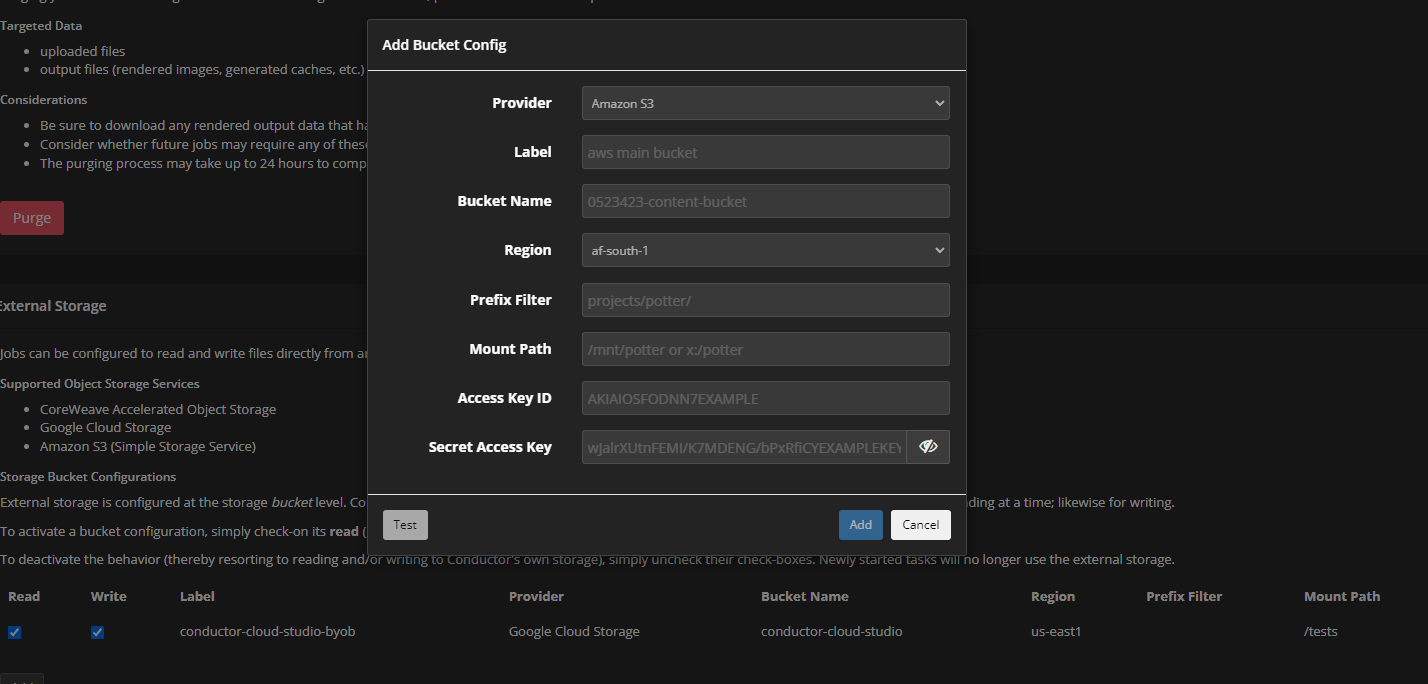
- At the bottom of the page, in External Storage, click on the Add button
- Fill in the form
- Region indicates the region of your storage. If it's a multi-region bucket, select one of the regions. This does limit instances from running in other regions.
- Prefix Filter is not supported at the moment. Please leave it blank.
- Mount Path is the path where the storage will be mounted on the render instances. EX: the bucket
gcs://my-bucket/my_projectswith a Mount Path of/my_studiowould be located at/my_studio/my_projects. - Path to the
jsonfile containing the Access Key.
- Click on the Test button in the form to ensure a connection can be made that has sufficient permissions
- Click OK and ensure that the Read and Write checkboxes are checked.
- At this point, any new jobs will attempt to read/write files directly to/from the External Storage
- If Read/Write checkboxes on the storage are unchecked, jobs will revert to the typical behavior of using uploaded files.
Submitting Jobs with BYOS
The process is mostly unchanged except for three key factors:
- Verify that the storage contains all necessary dependencies for the job to complete.
- Ensure that no files are uploaded. In most submitters, the scrapers need to be disabled. If any files are uploaded, they won't be available to the job.
- Check that all files are written to the output folder. This path will be created in your bucket at the root.
Warning
BYOS can incur significant egress costs on your GCP/AWS account. Each render instance will be pulling data independently from your storage as there's no caching mechanism. Please familiarize yourself with your Cloud providers egress charge policy. It's possible that egress fees (billed directly to your cloud account) could exceed Conductor's. If you wish to confine render instances to a specific region or zone, please reach out to Conductor's support team. For more details please see the GCP and AWS documentation on egress fees: